Avoid Bootstrap
Bootstrap's opinionated classes trade away granular control and come back to bite you later. Write your own SCSS or reach for Tailwind instead.
By Zaid
Last Updated: Oct 7, 2026

Bootstrap was an excellent tool built for a particular type of developer in a particular age.
This was the age when MVC frameworks ruled the web and being a web developer meant you had a very strong handle on C#/Java but saw CSS as a chore at best, a nightmare at worst.
We're no longer in that age and you're by no means, that developer. You've probably put "Full Stack Developer" in your Resume (definitely with >4 years of experience with Next.js App Router).
It's time to exhibit your extensive repertoire of skills. You're not intimidated by flexboxes, grids and media queries. You believe in writing original style rules that respect the amount of time UX Designers put into making bespoke web experiences for our clients.
Update: Quite alarmingly, Bootstrap is still the 3rd most popular design system solution on the web.
Sure, but why not? It saves me time
The main challenge with Bootstrap is flexibilty. You can glance at a website and instantly recognize if it was built on Bootstrap. They all look the same! Remember when all websites used to look like these?
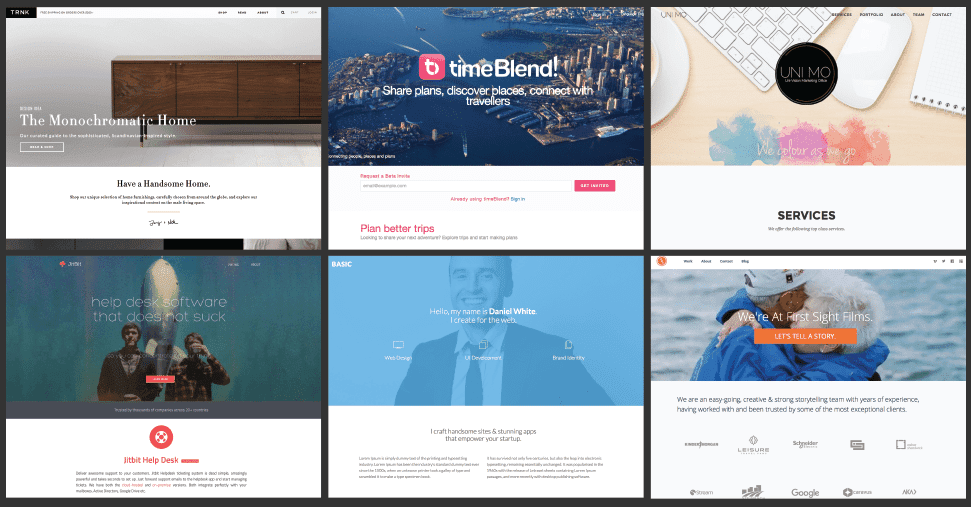
This is the catch which makes Bootstrap so easy to use, it does a lot of the styling legwork for you. This way, you lose granular control. Consider this most commonly used class,
.card {
  position: relative;
  display: flex;
  flex-direction: column;
  /* Unintuitive, potentially problematic workaround for a flexbox
    bug that once existed on some older browsers */
  min-width: 0;
  word-wrap: break-word; /* Deprecated property */
  background-color: #fff;
  background-clip: border-box; /* Unnecessary in most cases */
  /* Inconsistent with the hex for the background color. RGBA
    might also be less performant */
  border: 1px solid rgba(0, 0, 0, 0.125);
  border-radius: 0.25rem;
}
As you can see, you've lost a lot of granular control here. You can only safely override many of these properties by writing inline CSS (god forbid!) or writing your own CSS classes that override these properties with !important.
For the more skeptical readers or bootstrap enthusiasts, here's another, probably worse, yet an equally common example:
.row {
  display: flex;
  flex-wrap: wrap;
  /* ! Please don't ever use negative margins ! */
  margin-right: -15px;
  margin-left: -15px;
}
There's a very compelling argument to ban margins in CSS due to its several pitfalls, bewildering rules and most importantly, violation of seperation of concerns. Yet, negative margins exist on a completely unrivalled plane of CSS blasphemy. (If you don't see an entry on negative margins in this document, ask Zaid, the author to write one immediately). Quite reliably, these CSS rules will end up causing unexpected, often unwanted behavior on your layouts, forcing you to find ways to override these rules.
At this point, you'd be spending more time writing hazardous, unmaintainable code to apologize for Bootstrap's cavalier approach to CSS than actually building layouts before your deadline.
Any time gains early on in the project are eventually reversed in the later stages of the project in identifying and overriding CSS you didn't know existed.
I still hate writing CSS. What should I do instead?
People often argue that Tailwind is just repackaged Bootstrap. While the DX is quite reminiscent of Bootstrap, this couldn't be further from the truth. Here are two key reasons why:
-
Tailwind is fully configurable and extendable. You can define your own colors, margin sizes, border radii, animations, etc. based on the wireframes you're working with and either replace tailwind's defaults or extend them.
Boostrap offers themes but it's very limited by comparison and difficult to set one up yourself.
-
Each class serves a single purpose. It's very hard to find a tailwind class with more than 2 lines of CSS in it. Even harder to find any class that can't be modified by other classes.
For example; the horrifying bootstrap .card example is implemented this way in tailwind,
<div class="relative flex flex-col bg-white border border-gray-200 rounded">
  <!-- Card content goes here -->
</div>
Notice how each line of CSS in the first case is its own class and how border-gray-200 combines with border to result in border: 1px solid var(--gray-200). This granularity and modularity is a very powerful feature of tailwind, but it's also a huge pain to write and maintain.
It's very common to see JSX elements that are written like they're competing for a world record,
function ProductCard({ product }) {
	return (
		{/* This line is 231 characters long! (Don't ask me how I counted it) */}
		<div className="flex flex-col items-center justify-between p-4 m-2 bg-white border border-gray-200 rounded-lg shadow-md hover:shadow-lg transition-shadow duration-300 ease-in-out max-w-sm w-full sm:w-1/2 md:w-1/3 lg:w-1/4 xl:w-1/5">
			<img
				src={product.image}
				alt={product.name}
				className="w-full h-48 object-cover mb-4 rounded-md"
			/>
			{ /* 108 characters */ }
			<h2 className="text-xl font-semibold text-gray-800 mb-2 text-center line-clamp-2 hover:line-clamp-none">
				{product.name}
			</h2>
      { /* 88 characters */ }
			<p className="text-sm text-gray-600 mb-4 text-center line-clamp-3 hover:line-clamp-none">
				{product.description}
			</p>
			<div className="flex items-center justify-between w-full">
				<span className="text-lg font-bold text-blue-600">
					${product.price.toFixed(2)}
				</span>
        { /* 200 characters! Close runner up */ }
				<button className="px-4 py-2 bg-blue-500 text-white font-semibold rounded-md hover:bg-blue-600 focus:outline-none focus:ring-2 focus:ring-blue-500 focus:ring-opacity-50 transition-colors duration-300">
					Add to Cart
				</button>
			</div>
		</div>
	);
}
Takeaway: If you're planning to stick around in your project in the long term, SCSS is your best best but Tailwind is still a decent option if you're building an ultra-quick PoC for Vikhyat and/or Ali.